Need realistic human heights for characters, simulations, or test data? Our random height generator produces lifelike numbers in feet, inches, or centimeters — set the count, set the min and max, choose your units, and the tool returns a full list along with the average, the tallest and shortest result, and a CSV export. Whether you’re populating an RPG village, stress-testing a fitness app, or building a casting list of extras, this is the fastest way to get a believable dataset without rolling dice or making up numbers in your head.
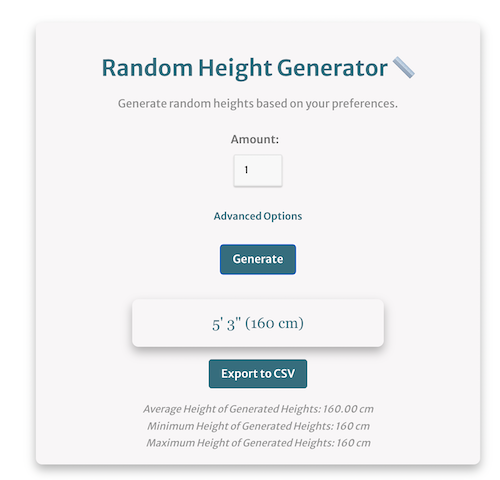
Random Height Generator 📏
Generate random heights based on your preferences.
What the Random Height Generator Produces
The tool above returns a list of human heights drawn at random from the range you specify. Each entry is shown in your chosen unit — either centimeters or feet and inches — and the output panel adds three summary statistics: the mean of the set, the tallest height, and the shortest. Furthermore, the CSV export button hands you the entire list as a downloadable file, ready to drop into Google Sheets, Excel, a database seed script, or a writing app. Because the generator runs entirely in your browser, the numbers are fresh on every click and nothing is logged.
By default, the bounds are set to a typical adult range, but you control them. Notably, the upper limit goes well past the verified human maximum and the lower limit dips into childhood ranges, so you can use the same tool for fantasy giants, NBA-style rosters, school groups, or scientific datasets. In addition, there’s no cap on how many heights you can generate per click — small batches of five or huge runs of several thousand both work the same way.
How the Random Height Generator Algorithm Works
Behind the scenes, this random height generator uses a pseudo-random number routine seeded by the browser’s cryptographic entropy source. Specifically, every height is sampled from a uniform distribution between the minimum and maximum you set. Uniform sampling means every value inside the range has an equal chance of being drawn — a height of 5’2″ is exactly as likely as a height of 6’4″ if both fall inside your bounds.
That’s a deliberate design choice, and it matters. A uniform distribution is the right default when you want maximum variety and no clustering around a “typical” height. However, real human populations don’t look uniform — they look roughly bell-shaped, with most adults clustered around the mean and tapering off in both directions. If you need that bell curve, generate a wider range and discard the extremes, or run the tool multiple times with overlapping ranges to weight the middle. For statisticians, the underlying transform from uniform to normal is the Box–Muller method, but for most creative and testing use cases the simple uniform output is exactly what you want.
The unit handling is also worth noting. Internally, the generator works in centimeters and rounds to one decimal place. Subsequently, when you switch to feet and inches, the converter splits the centimeter value into whole feet and inches with quarter-inch precision — so you’ll see 5’10¼” rather than the meaningless 5.86 feet that some calculators output. The CSV file preserves both the raw centimeter value and the formatted feet-and-inches string so you can sort numerically without losing the readable label.
Realistic Height Ranges to Plug Into the Tool
Generic “random” data is rarely useful. Therefore, the most important decision you’ll make is the min and max range. To save you from looking up averages, here are research-backed ranges you can plug straight in. Note that these reflect 2026 global data — average adult heights have crept upward by roughly 1 cm per decade in many countries, so older datasets understate modern populations slightly.
Adult global averages
For a worldwide adult sample, the average male height is around 171–175 cm (5’7″ to 5’9″) and the average female height is around 159–162 cm (5’2″ to 5’4″). Consequently, a sensible mixed-gender range to capture roughly 95% of adults is 150 cm to 190 cm (4’11” to 6’3″). For a male-only set, try 160–195 cm (5’3″ to 6’5″); for a female-only set, try 150–180 cm (4’11” to 5’11”).
Regional adjustments
Height varies meaningfully by region, so adjust your bounds if your project is location-specific. For example, in the Netherlands and Montenegro — currently the tallest countries on average — adult men cluster around 184 cm (6’0″) and women around 170 cm (5’7″). In contrast, in much of Southeast Asia and South Asia, adult men average closer to 165 cm (5’5″) and women around 153 cm (5’0″). For a Northern European cast, push your range to 165–200 cm; for a Southeast Asian sample, pull it back to 145–180 cm.
Children and teenagers
If you’re generating heights for a school setting or younger characters, here are typical ranges by age band: 5-year-olds average around 110 cm (3’7″), 10-year-olds around 138 cm (4’6″), 13-year-olds around 156 cm (5’1″), and 16-year-olds around 170 cm (5’7″). Set min and max about 10 cm above and below the target average to capture realistic variation within a single grade.
Fantasy and fictional ranges
For non-human characters, the bounds get more interesting. Tolkien hobbits sit around 90–120 cm (2’11” to 3’11”); D&D dwarves typically fall between 120 and 150 cm (3’11” to 4’11”); standard half-elves match the human range; orcs and half-orcs run 180–215 cm (5’11” to 7’1″); and giants in most rulebooks start at 240 cm (7’10”) and stretch upward. You can plug any of these into the random height generator and have a full party generated in seconds.
Use Cases for the Random Height Generator
People reach for this tool for far more reasons than you might expect. Below are the use cases we see most often, with concrete suggestions for how to set the bounds.
Tabletop RPG and video game character creation
Dungeon Masters and game designers use the generator to assign heights to NPCs in batch. Instead of giving every villager the same generic “average” height, run the tool once for each demographic in your setting — adult men, adult women, elderly characters, children — with the appropriate range, then paste the list into your campaign notes. For a tavern with twelve patrons, twelve realistic heights take about three seconds to produce.
Fiction writing and worldbuilding
Authors of novels, screenplays, and serialized fiction use random heights to break unconscious patterns. Notably, most writers default their leads to taller-than-average without realizing it, which produces an unrealistic cast. Generating a height before you describe a character forces you to write within the constraints rather than imposing them — a 5’4″ warrior, for instance, lands very differently than a 6’2″ one, and the random draw nudges you toward more varied descriptions.
Software testing and QA
Any application that stores a height field — fitness apps, medical records, dating profiles, telehealth tools, e-commerce sizing — needs realistic test data. Hardcoded fixtures like “180 cm” repeated across a thousand seed users mask bugs that only appear when the spread is real. Therefore, exporting 1,000 random heights from this tool to CSV gives you a believable seed file in seconds, and the CSV’s two-column format (centimeters and feet-and-inches) lets you test both unit displays without writing a converter.
Statistics teaching and demonstrations
Teachers use the generator to demonstrate sampling, mean, range, and the difference between uniform and normal distributions. A class can generate 30 random heights, compute the mean by hand, and compare it to the tool’s calculated average — a quick sanity check that builds intuition for descriptive statistics. Furthermore, generating two sets of 30 and comparing their averages introduces sampling variation in a tactile way no textbook example matches.
Casting, modeling, and creative briefs
Casting directors building extras lists, illustrators sketching crowds, and creative directors drafting character briefs all use the random height generator to avoid the “everyone is the same height” trap that creeps into uncoached visuals. Specifically, generating ten heights for a crowd of ten extras, then sketching to those constraints, produces a more visually interesting group than freehand drawing alone.
Step-by-Step: Using the Generator Effectively
The interface looks simple, but a few small choices upfront will save you re-runs later. Here’s the workflow that gets the cleanest output on the first try.
- Pick your unit first. If your downstream system expects centimeters (most data work, most international audiences), select cm before you touch the bounds. Otherwise, choose feet and inches. Switching mid-session re-formats every value and resets the bound fields.
- Set the count. The field accepts any integer up to several thousand. For test data, start with a small batch (10–20) to verify the bounds look right, then crank it up once the range checks out.
- Open Advanced Options and set min/max. Use the realistic ranges from the section above as a starting point. Resist the temptation to set a 100-cm-wide range “just in case” — narrower ranges produce more believable cohorts.
- Click Generate. The list, statistics, and CSV button all populate at once.
- Sanity-check the average. If the displayed average is wildly off from where you’d expect, your bounds are probably skewed. For instance, an average of 5’11” when you wanted “average adult woman” means your minimum is too high.
- Export to CSV. If you need the data downstream, hit Export. The file opens cleanly in Excel, Numbers, Google Sheets, or any database import wizard.
Reading the Statistics the Tool Returns
Three summary numbers appear under the result list: the average, the tallest height, and the shortest. Each one tells you something different about the run, and reading them together is faster than scrolling through the full output.
The average (technically the arithmetic mean) should land roughly in the middle of your min–max range. Significant drift from the midpoint usually means your sample size is too small to smooth out the randomness — generate 100+ values and the average will pull tight to the midpoint. Importantly, this average is sensitive to extreme values, so a couple of unusually tall or short results will tug it noticeably in small batches.
The tallest and shortest are the maximum and minimum of your generated set, not your input bounds. In a small run, you might set a max of 200 cm and never see anything above 192 cm — that’s normal. As the count grows, the observed range fills out and the tallest and shortest creep closer to your bounds. This is the law of large numbers in action, and it’s a good intuition check that the generator is sampling correctly.
Quick Conversion Reference: Feet, Inches, and Centimeters
The generator handles unit conversion automatically, but if you’re cross-referencing results with another dataset, this table covers the heights you’ll encounter most often.
| Feet & Inches | Centimeters | Notes |
|---|---|---|
| 4’10” | 147 cm | 5th percentile adult female (US) |
| 5’0″ | 152 cm | Average adult female, parts of Asia |
| 5’4″ | 163 cm | Global average adult female |
| 5’7″ | 170 cm | Tallest-country average adult female |
| 5’9″ | 175 cm | Global average adult male |
| 5’11” | 180 cm | Common “tall” threshold (men) |
| 6’0″ | 183 cm | Tallest-country average adult male |
| 6’2″ | 188 cm | 95th percentile adult male (US) |
| 6’5″ | 196 cm | NBA roster average |
| 6’9″ | 206 cm | Threshold for documented gigantism |
For a quick mental conversion: 1 inch ≈ 2.54 cm, 1 foot ≈ 30.48 cm, and a useful shortcut is that every 4 inches of height adds roughly 10 cm. Therefore, a result of 5’8″ lands at approximately 173 cm, and 6’0″ lands at 183 cm.
Limitations of the Random Height Generator
This tool is good for what it’s designed to do, but it’s important to know where it stops being the right tool. First, the output is uniformly distributed, not normally distributed. If you’re feeding the data into a statistics class, a machine-learning training set, or any context that assumes a bell curve, the raw output will skew your model. Generate a wider range and trim the tails, or use a dedicated statistics package like NumPy with np.random.normal() instead.
Second, the random height generator doesn’t know about correlations. Real human populations show height correlated with gender, age, geography, and ancestry, but the tool draws every value independently from your bounds. Consequently, if you need a dataset where each row also contains a gender and you want the heights to track gender realistically, generate two separate batches with appropriate bounds and tag them on import. Don’t ask the tool to model joint distributions — that’s not what it does.
Third, decimals can be a trap. Centimeters are reported to one decimal place, which is sensible, but for some use cases (medical records, official forms) you’ll want whole-number centimeters. Round in your spreadsheet after import; the generator doesn’t currently expose a precision setting.
Finally, this is an entertainment-and-prototyping tool. Don’t use it to seed a published dataset, claim it represents a real population, or substitute it for a sample drawn from actual measurement data. For research-grade work, use the WHO reference data or a peer-reviewed dataset.
Frequently Asked Questions
Is there a limit on how many random heights I can generate at once?
Practically, no. The tool runs entirely in your browser, so the limit depends on your device’s memory rather than a server cap. In testing, runs of 10,000+ heights complete in well under a second on a modern laptop. However, if you’re generating tens of thousands of values and your browser starts to lag, break the run into batches of 5,000 and concatenate the CSVs.
Can I use the output of the random height generator commercially?
Yes — the heights are random numbers, not copyrightable content. You can use them in published games, novels, mobile apps, research papers, or anything else without attribution. Naturally, if you cite the methodology, a link back to this page is appreciated but not required.
Why does my generated set’s average not exactly match my range midpoint?
That’s the law of small numbers. With a small sample (say, 10 heights), the average will bounce around the midpoint by several centimeters from run to run. Above 100 values, the average should sit within 1 cm of your true midpoint; above 1,000, it locks in to within a few millimeters. If you need an exact midpoint average, run with a higher count.
Does the generator support meters or just centimeters?
Display is in centimeters, not meters. To convert, divide by 100 in your spreadsheet — 175 cm becomes 1.75 m. Most height data internationally is reported in centimeters anyway, so this matches the convention used by the WHO, most medical literature, and most height databases. For inches-only output, choose feet and inches and ignore the foot column.
How is this different from a free Excel formula?
You can absolutely write =RANDBETWEEN(150, 190) in Excel and get the same uniform draw. The advantages of using a dedicated random height generator are: pre-built feet-and-inches conversion, a CSV export with both unit columns, the summary statistics, and the ability to share the link with non-technical collaborators who don’t want to crack open Excel. For a one-off batch in a spreadsheet you already have open, the formula is fine. For everything else, the tool is faster.
Can I get a normal (bell-curve) distribution instead of uniform?
Not directly inside the tool. However, there’s a workaround: set your range narrower than you actually want, then run the generator twice — once with a narrow “central” range and once with a wider “tail” range — and combine the two CSVs in roughly a 70/30 ratio. The result approximates a bell curve without leaving the tool. For exact normal distributions, NumPy’s random.normal(loc=mean, scale=std_dev) is the right choice.
Related Random Generators on CalculatorWise
If you’re putting together a mixed dataset or fleshing out a fictional cast, these companion tools pair naturally with the random height generator:
- Random Date Generator — pair heights with birthdays for full character profiles
- Random Year Generator — generate birth years to compute realistic ages alongside heights
- Random Day of the Week Generator — useful for scheduling and event-based test data
- Random Month Generator — round out date-related fields in seed data
- Random State Generator — add a US state to each generated profile