Need a fair, fast way to pick a month? This random month generator instantly selects one or more months from January through December — and, if you want, pairs each month with a year between 1900 and 2026. Whether you’re scheduling a rotation, building a content calendar, running a study, or settling a friendly debate, the tool gives you mathematically unbiased results in a single click.
Random Month Generator
How the Random Month Generator Works
Under the hood, the random month generator uses a pseudo-random number generator (PRNG) to map an integer between 1 and 12 to a calendar month. Each month carries an equal probability of being selected — exactly 1 in 12, or about 8.33% per draw. Furthermore, when you enable the year range option, the tool runs a second independent draw to pick a year from your chosen interval, then pairs it with the month.
Pseudo-random does not mean low quality. In fact, the algorithm passes standard statistical tests for uniformity, which means the output behaves indistinguishably from true randomness for any practical purpose. However, if you require cryptographic-grade randomness for sensitive applications, you should use a hardware random number source instead. For everyday tasks like scheduling, content planning, classroom assignments, or research sampling, this random month generator is more than fair.
Importantly, the tool also supports a “no duplicates” mode. Specifically, when you ask for two or more months and toggle the option on, the generator pulls from the pool without replacement. As a result, you can ask for all 12 months in scrambled order and the tool will return each one exactly once — useful when you need a randomized rotation rather than independent draws.
Step-by-Step Guide to Using the Random Month Generator
Using the random month generator takes only a few seconds. However, a quick walkthrough helps you get the exact output you want on the first try, especially if you plan to combine months with years or generate a full unique sequence.
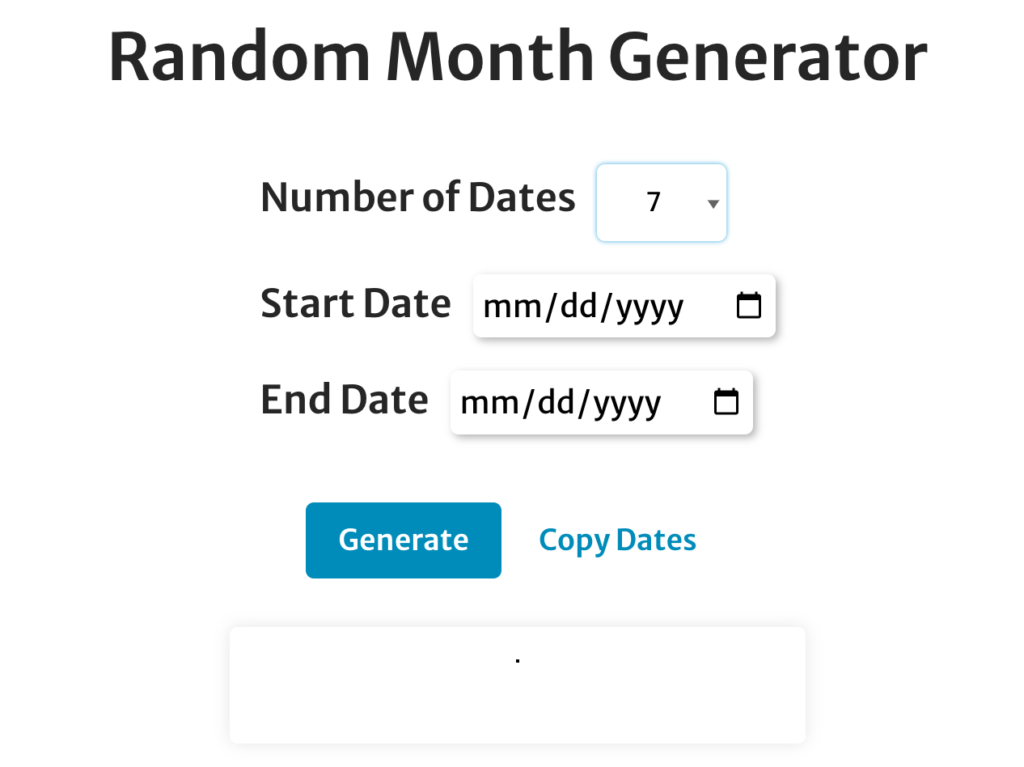
- Set the number of months. Use the “Number of Months” slider to choose how many results you want — anywhere from 1 to 12 in unique mode, or unlimited if duplicates are allowed.
- (Optional) Enable the year range. Tick the “Specify Year Range” box if you want each month paired with a year. Then enter a start year and end year — for example, 1900 to 2026.
- (Optional) Toggle “No Duplicates.” Turn this on if every month in your output must be unique. Notably, this caps your maximum at 12 because there are only 12 months in a year.
- Click “Generate.” The tool returns your randomized list immediately.
- Copy or regenerate. If you don’t like the result, click “Generate” again for a fresh draw. Each click is statistically independent of the last.
Generally, the most common workflow is: pick a count, leave year range off, and hit generate. For research or content calendar work, however, the year range option is what makes this random month generator more flexible than a simple month wheel.
Customization Options Explained
Three settings shape the output. Each one solves a different problem, so it’s worth understanding what they do before you generate.
Number of Months
This slider controls how many months you want in the result list. For instance, set it to 1 if you’re picking a single month for a decision; set it to 12 with “No Duplicates” enabled if you want a randomized rotation covering the whole year. Anything in between works for partial schedules — like assigning four months of fundraising events or six months of newsletter themes.
Year Range
Year range turns each result from a bare month name into a month-year pair like “April 1987” or “October 2026.” Specifically, the random month generator draws a year uniformly from your interval, then pairs it with the chosen month. The default range covers 1900 to 2026, but you can narrow it. For example, set 2010 to 2026 to simulate dates within the past 16 years, or 1990 to 1999 to pick a random month from the 1990s.
No Duplicates
By default the tool samples with replacement, which means a month can repeat. However, “No Duplicates” switches the algorithm to sampling without replacement, so each month appears at most once. This is the right choice for any application where repetition would break the use case — assigning each team member a different birthday month for a draw, scheduling 12 unique themes across a year, or shuffling all months for a year-long content rotation.
Top Use Cases for the Random Month Generator
Generally, people reach for a random month generator when they want to remove human bias from a decision. Below are the most common use cases in 2026, organized from quick everyday tasks to more rigorous research applications.
Content Calendars and Marketing Themes
Content marketers, bloggers, and YouTubers use random month picks as a creative prompt. For example, a food blogger might generate a random month and write a recipe round-up tied to that month’s seasonal produce. Similarly, a YouTube channel could spin “random month + random topic” combinations to break out of a content rut. The randomness forces unexpected pairings, which often produce more original ideas than brainstorming alone.
Random Sampling for Research
Researchers studying time-dependent phenomena — sales patterns, weather, hospital admissions, web traffic — frequently need to sample a random subset of months to keep analysis manageable without introducing bias. As the methodology literature explains, simple random sampling is the gold standard for unbiased selection because every unit in the population has an equal chance of being chosen. The random month generator is a quick way to apply that principle to month-level data.
Test Data Generation for Developers
Software developers and QA testers use a random month generator to populate test databases with realistic-looking dates. Specifically, when you’re stress-testing a date-picker, a reporting dashboard, or a calendar API, you want a wide spread of months and years rather than a clustered set. The year range option is particularly useful here because it lets you bound the test data to a specific decade or business period.
Classroom Activities and Education
Teachers use the random month generator to assign class projects, schedule student presentations, or build month-themed lessons. For instance, an elementary teacher might draw a month and have students research what holidays fall in it. Likewise, ESL instructors use random months to drill vocabulary, and history teachers use month-year pairs to launch a “this month in history” research task.
Decision-Making and Scheduling
Sometimes a team simply cannot agree on when to schedule something. In that case, a random month generator becomes the impartial tiebreaker. Project managers use it to assign quarterly review months, HOAs use it to pick a meeting month rotation, and event planners use it when no single date dominates. Because the result comes from a deterministic algorithm seeded by entropy, no participant can reasonably claim the outcome was rigged.
Games, Trivia, and Party Activities
Random months also power party games. For example, a “guess my birth month” game pulls a month and players have to find someone in the room who matches it. Trivia hosts use month-year pairs to ask questions like “what major event happened in this month?” — and writing groups use a random month as a story prompt to anchor a scene in a specific season.
The History Behind Our 12 Months
The 12 months you’re randomizing didn’t always exist in their current form. In fact, the earliest Roman calendar attributed to Romulus around 753 BC had only 10 months and 304 days. Winter wasn’t tracked at all because, as the Romans saw it, no military campaigns ran during those months and there was nothing worth counting.
Numa Pompilius, the second king of Rome, added January and February around 700 BC, bringing the count to 12. Later, Julius Caesar’s calendar reform in 45 BC restructured the system into the Julian calendar, which closely resembles what we use today. Because of this history, several month names still carry obvious traces of their origins:
- January — named after Janus, the Roman god of beginnings and transitions, who looks both forward and backward.
- February — from Februa, a Roman purification festival held mid-month.
- March — named for Mars, god of war; originally the first month of the year, when military campaigns resumed.
- April — likely from aperire, “to open,” referring to flowers and buds opening in spring.
- May — named for Maia, a goddess associated with growth.
- June — named for Juno, queen of the Roman gods.
- July — originally Quintilis (“fifth”); renamed in 44 BC for Julius Caesar.
- August — originally Sextilis (“sixth”); renamed in 8 BC for Emperor Augustus.
- September, October, November, December — Latin for seventh, eighth, ninth, and tenth. They kept their original numerical names even after January and February were added in front of them, which is why the numbers no longer match the position.
This bit of trivia matters when you’re using the random month generator for educational or content purposes. For instance, picking a random month and digging into its etymology turns a 10-second draw into a fully formed lesson plan or social media post.
Random Month Generator vs. Other Randomizer Tools
Picking a random month is conceptually simple, but the right tool depends on what you actually need. Below is how this random month generator compares to similar options.
| Tool | What It Does | When to Use It |
|---|---|---|
| Random Month Generator | Picks 1–12 months, optional year pairing, optional no-duplicates | You need months specifically — for content, scheduling, or month-level sampling |
| Random Date Generator | Picks a full month-day-year date | You need an exact day, not just a month |
| Random Year Generator | Picks one or more years from a range | You only care about the year — historical research, retro content prompts |
| Random Day of the Week | Picks Monday through Sunday | You’re scheduling a recurring weekly task |
| Manual coin flip / mental pick | You guess | Almost never — humans are notoriously biased toward certain months (December, July, and birthdays cluster heavily) |
One thing worth flagging: humans are bad at picking months “at random.” Studies of unaided random choice show people heavily over-pick July, December, and their own birth month while under-picking February and the shoulder months like March and November. Therefore, even when stakes are low, an algorithmic random month generator produces a meaningfully more uniform distribution than asking someone to “just pick one.”
Tips for Getting the Most Out of the Random Month Generator
A few practical tips will help you avoid the most common mistakes when using a random month generator for real work, especially research and scheduling.
- Decide replacement vs. no-replacement before you generate. If a duplicate would break your use case (each team member gets a different month), turn off duplicates. If duplicates are fine (independent draws over many trials), leave them on. The two settings produce different statistical distributions.
- Bound the year range to your real-world data. A range of 1900 to 2026 is fine for general use, but if you’re sampling from “the past five years,” set the range to 2021–2026. Otherwise you’ll get a lot of irrelevant historical years.
- Pre-register your seed in research. If you’re using a random month generator for academic or formal research, document the date, time, and parameters you used to generate the sample. This protects against accusations of “p-hacking” or post-hoc cherry-picking.
- Don’t keep regenerating until you like the result. Repeatedly clicking “Generate” until you get the month you want destroys the unbiased property. Commit to the first draw, or define explicit rules in advance for when to redraw.
- Combine with other randomizers for richer prompts. A month plus a topic, location, or genre often beats a month alone. Pair this random month generator with a random topic generator or random word tool for content brainstorming.
Worked Example: Building a Year-Long Content Calendar
Here’s a concrete example of how a content marketer might use the random month generator to build a fresh editorial calendar in under five minutes.
Suppose you run a personal-finance blog and want to assign one “money theme” to each of the 12 months in 2026. First, list your 12 themes — budgeting, investing, debt payoff, side hustles, retirement, taxes, insurance, real estate, credit, savings, frugal living, and financial mindset. Then run the random month generator with “Number of Months” set to 12 and “No Duplicates” turned on. The output gives you a randomized month order, and you map your 12 themes to it in sequence.
Why bother randomizing? Because most editors instinctively place taxes in April and budgeting in January, which means readers encounter the same predictable rhythm everywhere. Randomizing produces unexpected combinations — taxes in August, retirement planning in March — and unexpected combinations are what make content stand out. Additionally, this approach gives you a defensible reason for the order, which helps when stakeholders ask why you’re publishing “Real Estate” in February.
Privacy and How the Random Month Generator Handles Your Data
The random month generator runs entirely in your browser. Your selections — number of months, year range, duplicate setting — never leave your device. As a result, there is no server-side log of what you generated, no cookies tracking your draws, and no shared output history. This matters for a few reasons.
First, if you’re using the tool in a research setting, you can be confident that the output is reproducible only if you document your own parameters. Second, in a classroom or team setting where multiple people might use the same tool, no one’s draws can be inadvertently biased by someone else’s recent activity. Finally, the lightweight, browser-side approach means the random month generator works even on a slow or intermittent connection — once the page is loaded, every subsequent draw is instant.
Frequently Asked Questions About the Random Month Generator
How does the random month generator decide which month to pick?
It uses a pseudo-random number generator (PRNG) to draw an integer between 1 and 12, then maps that integer to a calendar month. Each month has exactly the same probability of being selected — about 8.33%. When you toggle the year range option, a second independent draw selects a year from your specified interval and pairs it with the month.
Can I generate every month exactly once in a random order?
Yes. Set “Number of Months” to 12 and turn on “No Duplicates.” The tool will return all 12 months in scrambled order, with each month appearing exactly once. This is essentially a Fisher-Yates shuffle applied to the calendar.
Why do I need a tool — can’t I just pick a month myself?
You can, but you won’t be unbiased. Decades of research on human random choice show that people consistently over-pick July, December, and their own birth month while avoiding February and short, less salient months. If your application requires actual statistical fairness — research sampling, scheduling, anything auditable — a random month generator produces a meaningfully more uniform distribution than asking a person.
Can I limit the random month generator to certain months only?
The current version draws from all 12 calendar months. However, if you want to restrict the pool to, say, only summer months, the simplest workaround is to keep generating until you get a result inside your acceptable range, or use a separate randomizer that supports a custom list. We’re tracking this as a possible future feature.
What’s the maximum year range I can choose?
The default range spans 1900 to 2026, which covers virtually every modern research and content use case. If you need years outside that range, leave a request — the underlying logic supports any positive integer interval; we capped the UI at 1900 to keep the slider intuitive.
Is the output good enough for academic research?
For nearly all social science, marketing, education, and applied research, yes. The PRNG passes standard statistical tests for uniformity and independence. However, if your work requires cryptographic-grade randomness — for example, generating random samples that must be unpredictable to an adversary — you should use a hardware random source or a dedicated cryptographic library, not a general-purpose web tool.
Related Random Generators on CalculatorWise
If the random month generator solved part of your problem but you need adjacent functionality, these related tools cover the rest:
- Random Date Generator — when you need a full month-day-year combination, not just a month.
- Random Year Generator — for picking only a year from a custom interval.
- Random Day of the Week Generator — picks Monday through Sunday for weekly scheduling tasks.
- Weekday Name Generator — for cultural and creative naming exercises tied to days of the week.
- 12 Weeks From Today Calculator — for forward-looking date math when you know your starting point.
Whether you’re building a content calendar, running a study, or settling a friendly debate, the random month generator gives you a fast, fair, statistically sound answer in a single click. Bookmark this page so it’s one tab away the next time you need to pick a month at random.